
Smooth Motion Factory
YouTube Comments Gone? It happens on Vertical Monitors & Split Screens! 본문
YouTube Comments Gone? It happens on Vertical Monitors & Split Screens!
Smooth Motion 2025. 12. 17. 10:16
YouTube Comments Gone? It happens on Vertical Monitors & Split Screens!
Do you use a Vertical Monitor? Or perhaps you often split your screen to watch YouTube while working on something else?
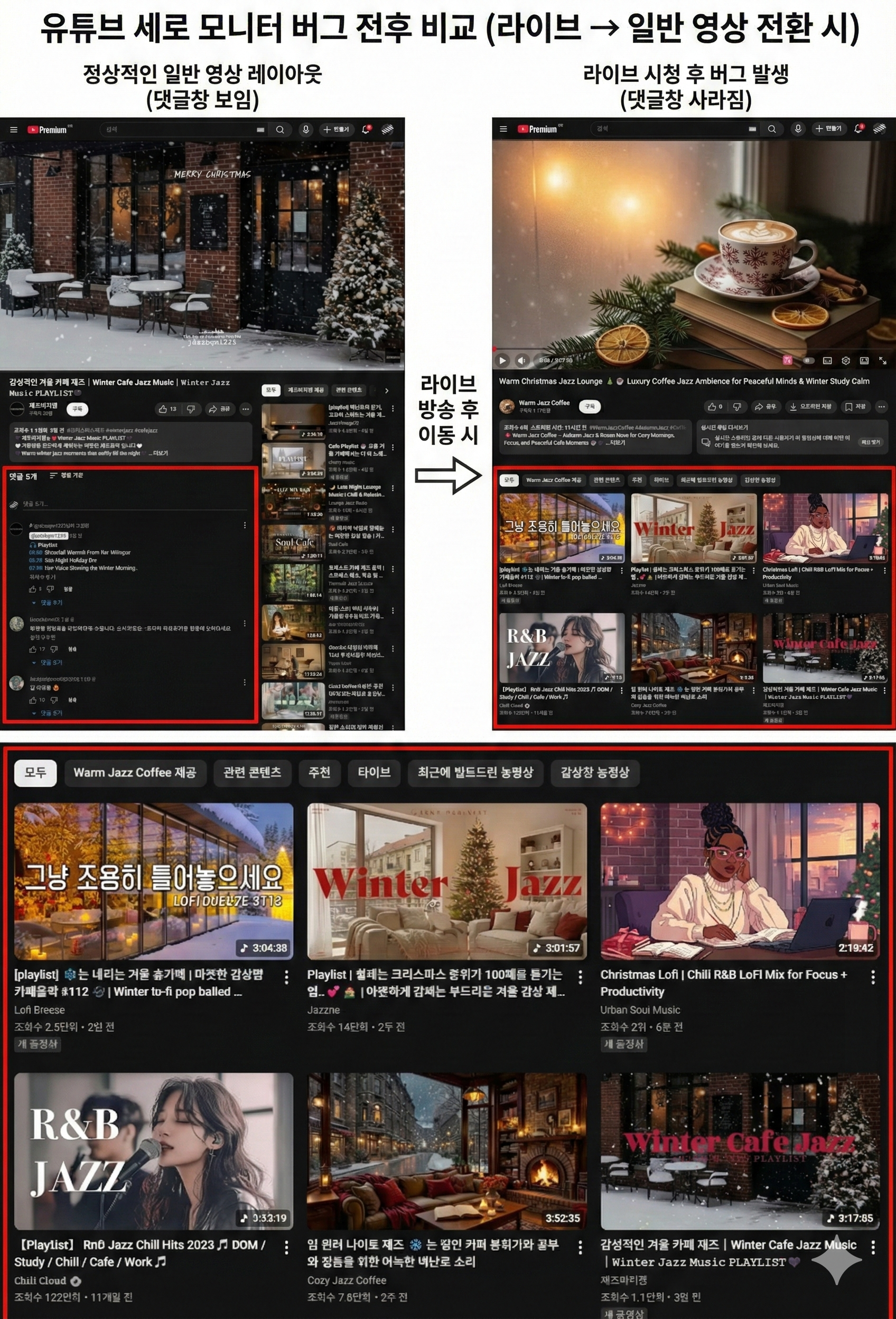
If so, you might have experienced this annoying bug: "Watching a YouTube Live stream, then clicking on a normal video, only to find the comment section has completely disappeared."
This isn't just a random glitch. It is a specific bug that affects anyone using a narrow browser window.

1. Who is affected? (Bug Conditions)
This issue occurs 100% of the time under the following specific conditions.
1. Vertical Monitor Users: Developers or designers using pivot monitors.
2. Split Screen / Multitaskers: Users who drag the browser to the side (Windows Snap) or resize the window to be narrow.
The Trigger: Watching YouTube Live (Chat active) → Clicking a Normal Video.
The Result: Comments disappear because the browser fails to switch from the "Live Chat Layout" to the "Normal Comment Layout" in a narrow viewport.
2. Why does this happen?
YouTube is a "Responsive Web." When the window width is narrow (like on a mobile phone, vertical monitor, or split screen), the layout changes.
The problem is that when you move from a Live stream to a normal video, Chrome often gets confused and thinks, "Should I still keep the Chat Box space?" This causes the comment section to fail to load or be covered by the recommended video list.
3. Solution: YouTube Layout Bug Fix
Resizing the window back and forth or refreshing (F5) every time is frustrating. I developed an extension to fix this automatically for all "Narrow View" users.
- Auto Detection: Detects layout breakage in any narrow environment (Vertical Monitor, Split Screen, etc.).
- Auto Recovery: No manual action needed. It automatically refreshes and restores the comment section instantly.
4. Download
Download YouTube.Layout.Bug.Fix.zipUpdate Details | GitHub Main Page
5. How to Install
Since this is a custom extension, follow these simple steps to install:
- Download the file above and unzip it.
- Open Chrome, type
chrome://extensionsin the address bar, and press Enter. - Toggle the 'Developer mode' switch in the top right corner to ON.
- Click the newly appeared 'Load unpacked' button.
- Select the unzipped 'YouTube Layout Bug Fix' folder.
- Once loaded, the installation is complete!
Tags
#VerticalMonitor #SplitScreen #Multitasking #YouTubeBug #ChromeExtension
유튜브 댓글창 실종 사건! 범인은 '세로 모니터'와 '화면 분할' 입니다.
혹시 세로 모니터(피벗)를 사용하시나요? 아니면 모니터 하나로 화면을 반으로 나눠서(Split View) 유튜브를 보시나요?
그렇다면 분명 이런 경험이 있으실 겁니다. "유튜브 라이브 방송을 보다가 다른 일반 영상을 클릭했는데, 댓글창이 감쪽같이 사라져 버리는 현상" 말입니다.
처음엔 단순한 오류인 줄 알았지만, 확인 결과 이는 브라우저 창을 좁게 쓰는 모든 사용자에게 발생하는 치명적인 버그였습니다.
1. 어떤 상황에서 발생하나요?
이 문제는 단순히 모니터 방향의 문제가 아니라, '창의 너비'가 좁을 때 발생합니다.
1. 세로 모니터 사용자: 피벗 모니터를 사용하는 개발자, 직장인.
2. 화면 분할 사용자: 큰 모니터에서 창을 좌우로 나누거나, 브라우저 폭을 좁게 줄여서 쓰는 멀티태스킹 유저.
증상: [라이브 방송 시청] 후 [일반 영상]으로 넘어갈 때, 하단 댓글창이 실종됨. (라이브 채팅 레이아웃이 찌꺼기처럼 남아 일반 댓글창을 덮어버림)
2. 왜 이런 문제가 생길까?
유튜브는 화면 크기에 따라 구조가 변하는 '반응형 웹'입니다. 창 너비가 좁아지면 모바일과 비슷한 레이아웃을 취하게 되는데, 이때 '라이브 채팅창'과 '일반 댓글창'의 전환 과정에서 충돌이 일어납니다.
브라우저가 "어? 방금까지 라이브였는데?" 하고 착각하여, 일반 영상에서도 라이브용 레이아웃(빈 공간)을 유지하려다가 댓글창을 제대로 불러오지 못하는 것입니다.
3. 해결 방법: YouTube Layout Bug Fix
매번 창 크기를 늘렸다 줄이거나 F5를 누르는 건 너무 번거롭습니다. 그래서 세로 모니터 및 화면 분할 사용자들을 위한 자동 복구 프로그램을 만들었습니다.
- 자동 감지: 세로 모니터든, 화면 분할이든 '좁은 화면'에서 발생하는 레이아웃 깨짐을 모두 감지합니다.
- 자동 해결: 사용자가 신경 쓸 필요 없이, 버그가 감지되면 즉시 페이지를 새로고침하여 댓글창을 찾아줍니다.
4. 다운로드
아래 버튼을 눌러 프로그램을 다운로드하세요.
Download YouTube.Layout.Bug.Fix.zipUpdate Details | GitHub Main Page
5. 설치 방법
압축 해제 후 개발자 모드를 통해 설치하는 방식입니다.
- 위 버튼을 눌러 파일을 다운로드하고 압축을 풀어주세요.
- 크롬 주소창에
chrome://extensions를 입력하고 엔터를 누릅니다. - 우측 상단의 '개발자 모드' 토글 스위치를 켜서 활성화합니다.
- 새로 생긴 '압축 해제된 확장 프로그램을 로드합니다' 버튼을 클릭합니다.
- 1번 단계에서 압축을 푼 'YouTube Layout Bug Fix' 폴더를 선택합니다.
- 목록에 프로그램이 나타나면 설치 완료! 이제 좁은 화면에서도 쾌적하게 유튜브를 즐기세요.
검색어 태그
#세로모니터 #화면분할 #유튜브오류 #유튜브댓글사라짐 #멀티태스킹 #ChromeExtension
'Tool' 카테고리의 다른 글
| OAR External Tool 1.1 (0) | 2026.02.23 |
|---|---|
| OAR External Tool (0) | 2026.02.14 |
| 움짤 메이커 / GifClip Maker (v3.1) : GIF/WebP Converter (0) | 2025.12.13 |
| Smooth's Tool Updates (0) | 2025.12.13 |
| GifClip Maker / 움짤 메이커 (Video To GIF/WebP Tool) (0) | 2025.12.11 |


