
Smooth Motion Factory
OAR External Tool 1.1 본문
반응형
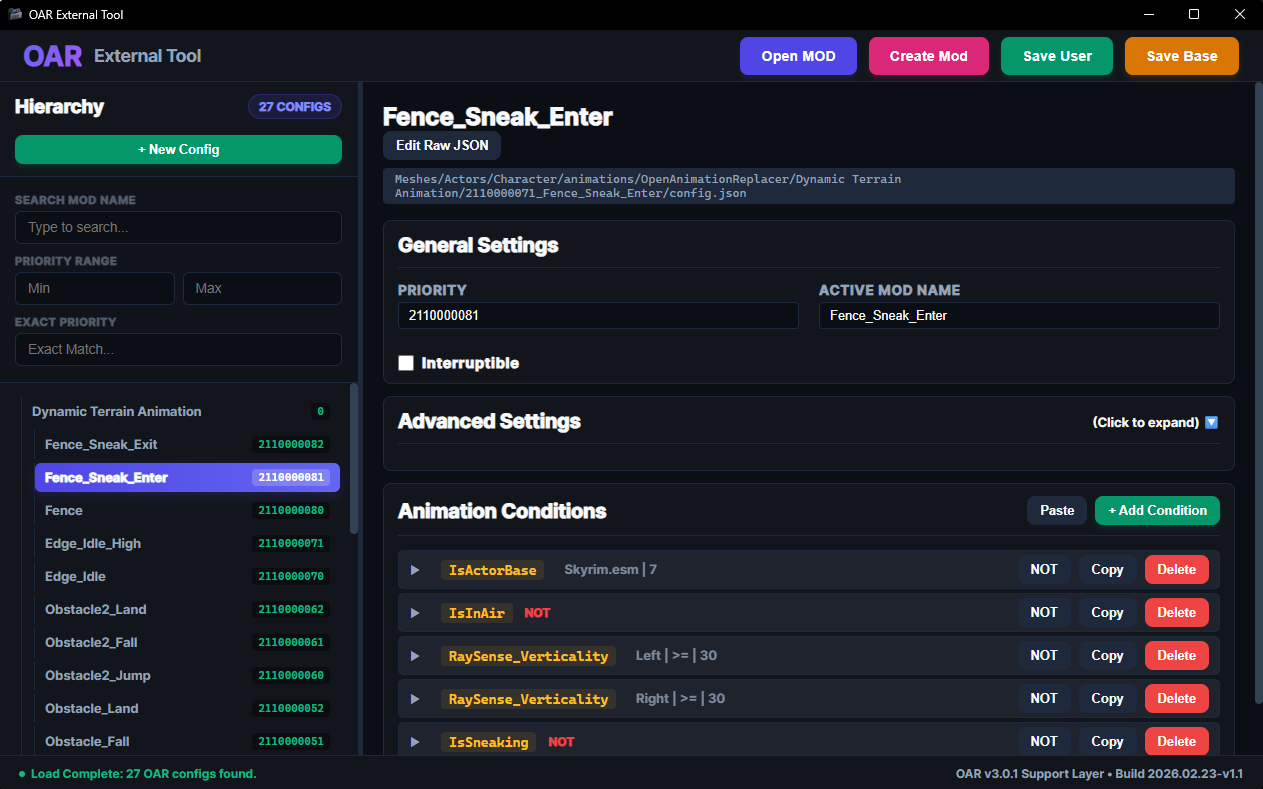
OAR-Editor-Web 1.1 Update Log
Features
- Added EXACT PRIORITY Filter: Added a separate search bar to filter by a specific priority number, in addition to the existing Min/Max method.
- Ported 51 Unimplemented Conditions: Analyzed the OAR 3.0.1+ source code to include 51 core condition triggers, such as
IsSwimmingandFallDistance, allowing full selection and value control (Float/Int/Flag). - Added Advanced Settings UI Tab: Added control options for advanced
config.jsonflags that were previously difficult for general users to access, includingreplaceOnLoop,blendTimeOnEcho, andoverrideAnimationsFolder. - Added Icons
Fixes & Optimizations
Rendering
- Fixed EXACT PRIORITY NaN Error Crash: Fixed a critical UI bug where clearing the search bar caused a
NaNvalue, leading the tree to disappear and the app to freeze. - Optimized Search DOM Debounce (Mitigated Freezing): Resolved the issue of synchronously destroying and rebuilding thousands of DOM nodes per keystroke. The UI now re-renders only once, 200ms after the user finishes typing.
System
- Introduced Backup to Prevent Save File Corruption: Previously, using
createWritable()to overwrite the original JSON could result in a 0KB file if power was lost or disk space ran out. This patch introduces a Safe-Write structure that createsconfig_backup.jsonbefore overwriting the original file. - OAR 3.0.1+ Engine Compatibility (Data Type Casting): JavaScript tends to treat input numbers as strings (e.g.,
"10.5"), which could conflict with the OAR engine. Updated the schema to force conversion to Number types usingparseFloat()andparseInt()immediately upon user input. - Introduced WebView2 Runtime Guidance: Fixed an issue where the app would silently close with an
Initialize Failedpopup on PCs without the WebView2 runtime. Added a notification and redirect to the Microsoft Edge download page inMainForm.cs.
Build & UI/UX
- [UI/UX] Fixed Edit Raw JSON Line Alignment (CSS Fix): Fixed a pixel misalignment between JSON text and line numbers during scrolling by unifying
font-size(0.95rem) andline-height(1.6) for both areas. - [UI/UX] Fixed Incorrect Option Display for Root Folders: Corrected a bug where clicking a top-level mod folder without animations incorrectly displayed
Interruptible,Advanced Settings, andAnimation Conditions. These are now hidden via conditional rendering.
Download OAR-Editor-Web 1.1
OAR-Editor-Web 1.1 업데이트 로그
새로운 기능 (Features)
- 정확한 우선순위(EXACT PRIORITY) 필터 추가: 기존의 최소/최대(Min/Max) 방식 외에 특정 우선순위 숫자로 필터링할 수 있는 별도의 검색창을 추가했습니다.
- 미구현 조건 51개 포팅: OAR 3.0.1+ 소스 코드를 분석하여
IsSwimming,FallDistance등 51개의 핵심 조건 트리거를 추가했습니다. 이제 모든 조건을 선택하고 값(Float/Int/Flag)을 제어할 수 있습니다. - 고급 설정(Advanced Settings) UI 탭 추가: 일반 사용자가 접근하기 어려웠던
config.json의 고급 플래그 제어 옵션(replaceOnLoop,blendTimeOnEcho,overrideAnimationsFolder)을 추가했습니다. - 아이콘 추가
수정 및 최적화 (Fixes & Optimizations)
렌더링 (Rendering)
- 정확한 우선순위(EXACT PRIORITY) NaN 오류 크래시 수정: 검색창을 비울 때
NaN값이 발생하여 트리가 사라지고 앱이 멈추는 치명적인 UI 버그를 수정했습니다. - 검색 DOM 디바운스 최적화 (멈춤 현상 완화): 키를 입력할 때마다 수천 개의 DOM 노드를 동기적으로 파괴하고 다시 생성하던 문제를 해결했습니다. 이제 사용자가 입력을 마친 후 200ms 뒤에 UI가 한 번만 다시 렌더링됩니다.
시스템 (System)
- 저장 파일 손상 방지를 위한 백업 도입: 기존에는 원본 JSON을 덮어쓸 때
createWritable()을 사용하면 전원이 끊기거나 디스크 공간이 부족할 경우 0KB 파일이 될 위험이 있었습니다. 이번 패치에서는 원본 파일을 덮어쓰기 전에config_backup.json을 생성하는 안전한 쓰기(Safe-Write) 구조를 도입했습니다. - OAR 3.0.1+ 엔진 호환성 (데이터 타입 캐스팅): JavaScript는 입력된 숫자를 문자열(예:
"10.5")로 취급하는 경향이 있어 OAR 엔진과 충돌할 수 있었습니다. 사용자 입력 즉시parseFloat()및parseInt()를 사용하여 강제로 숫자(Number) 타입으로 변환하도록 스키마를 업데이트했습니다. - WebView2 런타임 안내 도입: WebView2 런타임이 없는 PC에서
Initialize Failed팝업과 함께 앱이 조용히 종료되던 문제를 수정했습니다.MainForm.cs에 알림을 추가하고 Microsoft Edge 다운로드 페이지로 리디렉션되도록 했습니다.
빌드 및 UI/UX (Build & UI/UX)
- [UI/UX] Raw JSON 편집 줄 정렬 수정 (CSS Fix): 스크롤 시 JSON 텍스트와 줄 번호 사이의 픽셀 어긋남을 두 영역의
font-size(0.95rem)와line-height(1.6)를 통일하여 수정했습니다. - [UI/UX] 루트 폴더의 잘못된 옵션 표시 수정: 애니메이션이 없는 최상위 모드 폴더를 클릭할 때
Interruptible,Advanced Settings,Animation Conditions가 잘못 표시되던 버그를 수정했습니다. 이제 조건부 렌더링을 통해 숨겨집니다.
OAR-Editor-Web 1.1 다운로드
반응형
'Tool' 카테고리의 다른 글
| OAR External Tool (0) | 2026.02.14 |
|---|---|
| YouTube Comments Gone? It happens on Vertical Monitors & Split Screens! (0) | 2025.12.17 |
| 움짤 메이커 / GifClip Maker (v3.1) : GIF/WebP Converter (0) | 2025.12.13 |
| Smooth's Tool Updates (0) | 2025.12.13 |
| GifClip Maker / 움짤 메이커 (Video To GIF/WebP Tool) (0) | 2025.12.11 |
'Tool' Related Articles
more


