Smooth Motion Factory
Video to GIF Converter VtoG (Free Windows Tool) 본문
VtoG — Video to GIF Converter (Free Windows Tool)
Convert any video clip into a clean, optimized GIF with full control over quality, FPS, resolution, and clip range.
What is VtoG?
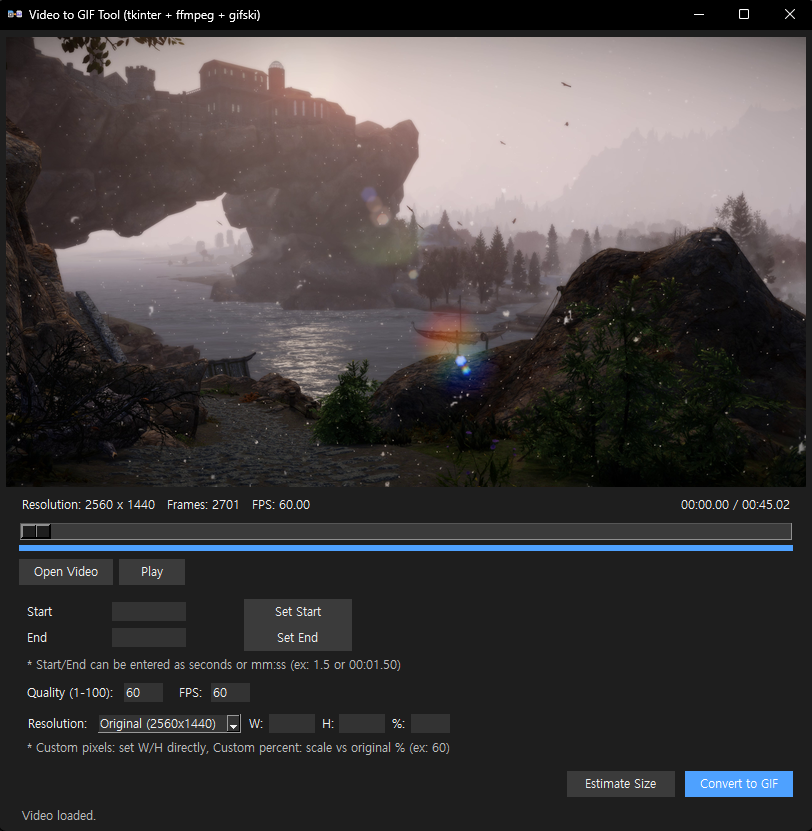
VtoG is a lightweight Windows tool that converts video files to GIF format using a simple, clean GUI.
It is built with Python (tkinter) and uses ffmpeg and gifski under the hood to generate high-quality GIFs. All required binaries are included in the download, so you can use it right away without any extra setup.
Key Features
- Video to GIF conversion — Supports common video formats such as
mp4,mkv,avi,mov,webm, andwmv. - Real-time video preview — Scrub through the video with a timeline slider and preview frames directly inside the app.
- Play / Pause control — Check your motion and timing before you export the GIF.
- Start / End range selection — Set the clip range using the current frame or by manually entering time values.
- Flexible time input — Enter times as seconds (e.g.
1.5) or in time format likemm:ssorhh:mm:ss. - Visual range bar — The selected start/end section is highlighted on a small timeline bar under the slider.
- Quality control (1–100) — Fine-tune GIF quality via gifski for a better balance between size and visual fidelity.
- Custom FPS — Set the output GIF frame rate to match your needs (smooth animation vs. smaller file size).
- Resolution options:
- Keep the original resolution.
- Use preset resolutions such as 1920x1080, 1280x720, etc.
- Set custom pixel size (width / height).
- Scale using percentage based on the original resolution (e.g. 60%).
- Accurate size estimation — Estimate the final GIF file size before converting by encoding a short sample segment.
- Drag & Drop support — Drop a video file onto the window to open it instantly.
- No visible command windows — ffmpeg and gifski run in the background; no extra console windows popping up.
- Conversion progress dialog:
- Shows a small progress window with a loading bar while converting.
- Includes a Cancel button to stop the current conversion safely.
- The dialog automatically closes when the conversion is finished, canceled, or if an error occurs.
- High-resolution support — The tool respects the resolution you choose and prevents unwanted downscaling by gifski.
- Standalone package — VtoG, ffmpeg, and gifski are bundled together in a single folder. No installation required.
How to Use
- Download and extract
Extract all files from the archive into a single folder.
You should see:VtoG.exe(orvideo_to_gif_gui.exe)ffmpeg.exegifski.exeREADME_EN.txt/README_KR.txt
- Run the tool
Double-clickVtoG.exeto launch the application. - Open a video
Click the Open Video button or drag and drop a video file into the window. - Set the clip range
Use the timeline slider to move to the desired frame, then click:- Set Start to define the start time.
- Set End to define the end time.
- Adjust quality, FPS, and resolution
Choose your quality (1–100), FPS, and resolution mode (Original / Preset / Custom pixels / Custom percent). - Estimate file size (optional)
Click Estimate Size to approximate the final GIF size before converting.
This is especially useful for high-resolution or long clips. - Convert to GIF
Click Convert to GIF and a small progress window will appear.
You can cancel the process at any time using the Cancel button in that window. - Check the output
When the conversion is done, the GIF file is saved in the same folder as the original video, with a name like:VideoName_q60_fps60.gif
System Requirements
- OS: Windows
- CPU: Any modern CPU that can handle basic video decoding
- Dependencies: ffmpeg.exe and gifski.exe (already included in the package)
- Installation: No installation required — just extract and run.
Notes & Limitations
- High-resolution GIFs (e.g. 1080p and above) can become very large. Consider lowering resolution, FPS, or quality for better file sizes.
- The output resolution is automatically adjusted to even numbers to avoid encoder issues.
- Very short clips may produce less accurate size estimates, since the estimation uses a small sample duration.
- All binaries are unmodified official builds of ffmpeg and gifski; they follow their own licenses.
- Because this is not a video player, the video may play back slowly, but this does not affect the final output.
Download
You can download the latest version of VtoG from the link below:
Download VtoG (Video to GIF Converter)
github.com/skypia0147-dev/VtoG/releases
Changelog
- v1.0
- Initial public release.
- Video preview with timeline and range selection.
- Quality, FPS, and resolution controls.
- Size estimation feature.
- Background conversion with a cancelable progress dialog.
- Drag & drop support for video files.
Closing
VtoG is designed as a practical tool for creators who frequently need to convert short video clips into optimized GIFs. If you find it useful or have ideas for improvements, feel free to share feedback or request new features.
VtoG — Video to GIF 변환기 (무료 Windows 툴)
비디오 클립을 고품질 GIF로 변환할 수 있는 간단하고 강력한 Windows용 도구입니다.
VtoG란?
VtoG는 비디오 파일을 GIF 형식으로 변환하기 위한 가벼운 Windows GUI 툴입니다.
Python(tkinter) 기반으로 제작되었으며, 내부적으로 ffmpeg와 gifski를 사용해 품질이 뛰어난 GIF 파일을 생성합니다.
필요한 모든 실행 파일이 함께 포함되어 있어 별도의 설치나 추가 설정 없이 바로 사용할 수 있습니다.
주요 기능
- 비디오 → GIF 변환 —
mp4,mkv,avi,mov,webm,wmv등 주요 비디오 포맷 지원 - 실시간 비디오 미리보기 — 타임라인 슬라이더를 이용해 프레임 단위로 영상 확인 가능
- 재생 / 일시정지 — 변환 전에 모션과 타이밍을 직접 확인
- 시작 / 종료 구간 설정 — 현재 프레임 기준으로 Start / End 설정 가능
- 유연한 시간 입력 — 초 단위(
1.5) 또는 시간 형식(mm:ss,hh:mm:ss) 입력 지원 - 시각적인 구간 표시 — 선택한 변환 구간이 타임라인 바에 강조 표시됨
- 품질 조절 (1~100) — gifski 기반의 정밀한 품질 제어로 용량과 화질의 균형 조절 가능
- FPS 설정 — 출력 GIF의 프레임 레이트를 직접 지정
- 다양한 해상도 옵션:
- 원본 해상도 유지
- 프리셋 해상도 (1920x1080, 1280x720 등)
- 사용자 지정 픽셀 해상도 (가로 / 세로 직접 입력)
- 퍼센트 기반 스케일 (원본 대비 60% 등)
- GIF 용량 예상 기능 — 변환 전에 짧은 샘플을 인코딩하여 최종 용량을 미리 예측
- 드래그 앤 드롭 지원 — 비디오 파일을 창으로 끌어다 놓아 바로 열기 가능
- CMD 창 미표시 — ffmpeg / gifski는 백그라운드에서 실행되며 별도의 콘솔 창이 나타나지 않음
- 변환 진행 다이얼로그:
- 변환 중 로딩바가 표시되는 전용 창 제공
- Cancel 버튼을 통해 언제든지 변환 중단 가능
- 완료, 취소, 오류 발생 시 자동으로 창이 닫힘
- 해상도 강제 유지 — gifski의 자동 다운스케일을 방지하여 지정한 해상도를 그대로 출력
- 단일 폴더 실행 — 실행 파일과 모든 의존성이 한 폴더에 포함된 완전 독립형 툴
사용 방법
- 다운로드 및 압축 해제
압축 파일을 하나의 폴더에 모두 해제합니다.
폴더 안에는 다음 파일들이 있어야 합니다:VtoG.exeffmpeg.exegifski.exeREADME_EN.txt/README_KR.txt
- 프로그램 실행
VtoG.exe를 더블 클릭하여 실행합니다. - 비디오 열기
Open Video 버튼을 누르거나 비디오 파일을 창으로 드래그 앤 드롭합니다. - 변환 구간 설정
타임라인 슬라이더로 원하는 위치로 이동한 후:- Set Start 버튼으로 시작 구간 설정
- Set End 버튼으로 종료 구간 설정
- 옵션 설정
품질(1~100), FPS, 해상도 모드를 원하는 값으로 설정합니다. - 용량 예상 (선택)
Estimate Size 버튼을 눌러 변환 후 예상 GIF 용량을 확인할 수 있습니다.
고해상도 또는 긴 영상 변환 시 특히 유용합니다. - GIF 변환
Convert to GIF 버튼을 클릭하면 변환 진행 창이 나타납니다.
필요 시 Cancel 버튼으로 작업을 중단할 수 있습니다. - 결과 확인
변환이 완료되면 GIF 파일이 원본 비디오와 동일한 폴더에 저장됩니다.
파일 이름 예시:VideoName_q60_fps60.gif
시스템 요구 사항
- 운영체제: Windows
- CPU: 일반적인 비디오 디코딩이 가능한 CPU
- 의존성: ffmpeg.exe, gifski.exe (패키지에 포함됨)
- 설치: 설치 필요 없음 — 압축 해제 후 바로 실행
참고 사항
- 1080p 이상의 고해상도 GIF는 파일 크기가 매우 커질 수 있습니다. 필요에 따라 해상도, FPS, 품질을 조절하세요.
- 출력 해상도는 인코더 호환성을 위해 자동으로 짝수 값으로 보정됩니다.
- 아주 짧은 클립의 경우 용량 예상 정확도가 다소 낮을 수 있습니다.
- ffmpeg 및 gifski는 수정되지 않은 공식 바이너리이며, 각 툴의 라이선스를 따릅니다.
- 이 프로그램은 동영상 플레이어가 아니기 때문에 재생이 느릴 수 있지만, 최종 GIF 결과에는 전혀 영향을 주지 않습니다.
다운로드
아래 링크에서 최신 버전의 VtoG를 다운로드할 수 있습니다.
다운로드 VtoG (Video to GIF Converter)
github.com/skypia0147-dev/VtoG/releases
업데이트 로그
- v1.0
- 최초 공개 버전
- 비디오 미리보기 및 타임라인 구간 설정
- 품질, FPS, 해상도 제어 기능
- GIF 용량 예상 기능
- 중단 가능한 백그라운드 변환 시스템
- 드래그 앤 드롭 지원
마무리
VtoG는 짧은 비디오 클립을 효율적으로 GIF로 변환해야 하는 사용자들을 위해 제작된 실용적인 도구입니다. 사용해보시고 개선 아이디어나 피드백이 있다면 언제든지 공유해 주세요.
'Tool' 카테고리의 다른 글
| OAR External Tool (0) | 2026.02.14 |
|---|---|
| YouTube Comments Gone? It happens on Vertical Monitors & Split Screens! (0) | 2025.12.17 |
| 움짤 메이커 / GifClip Maker (v3.1) : GIF/WebP Converter (0) | 2025.12.13 |
| Smooth's Tool Updates (0) | 2025.12.13 |
| GifClip Maker / 움짤 메이커 (Video To GIF/WebP Tool) (0) | 2025.12.11 |


