Smooth Motion Factory
For Honor in Skyrim Grapple 1.3 본문
For Honor in Skyrim Grapple 1.3
Smooth Motion 2026. 1. 25. 08:05
For Honor in Skyrim Grapple - v1.3 Update & MCM Guide
The Grapple mod has been updated to version 1.3. This update includes the removal of the MCO dependency, significant improvements to MCM options, and bug fixes.
v1.3 Update Log
- Removed dependency on "Trigger Combat Behaviour - TCB"
- Changed grapple detection from "On Hit" to physical collision (whether characters actually touch)
- Grapples now only apply to targets you are facing
- Added dedicated controller key binding in the MCM. Keyboards and controllers now have separate bindings, allowing you to switch between them seamlessly.
- Added logic to reset the cooldown upon loading a save file.
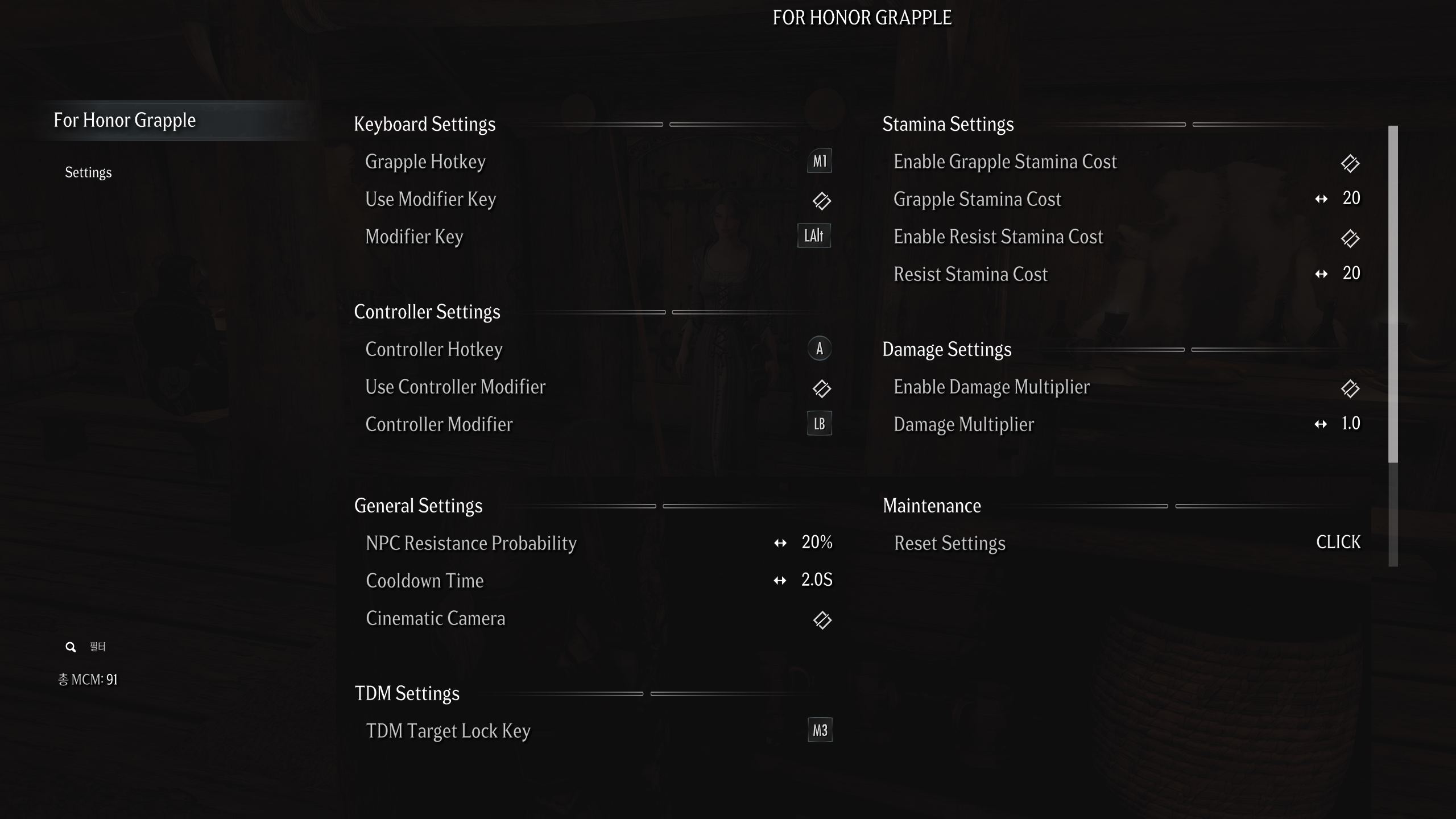
MCM Configuration Guide
This section explains the MCM (Mod Configuration Menu) options in detail. Adjust these settings to optimize the mod for your playstyle and difficulty preferences.
1. Grapple Settings
- Grapple Hotkey: Assign the key to trigger the grapple skill.
- NPC Resistance Probability: Sets the chance (0~100%) that an NPC will resist or counter your grapple attempt. Higher values increase combat difficulty.
- Cinematic Camera: Decides whether to use cinematic camera effects (like killmove cameras) during grapple animations. Unchecking this keeps the camera in standard 3rd person view.
2. TDM Settings
Convenience features for users of the True Directional Movement (TDM) mod.
- TDM Target Lock Key: Set this to match your TDM Lock-on key.
- Function: If you attempt a grapple while target-locked, this automatically inputs the key to unlock the target. This prevents animation glitching or dizzying camera movements.
3. Modifier Key Settings
Supports combination keys (e.g., Shift + G) to prevent shortage of hotkeys or accidental inputs.
- Use Modifier Key: When enabled, the skill triggers only via Modifier Key + Hotkey.
- Modifier Key: Select the key to hold down (Shift, Ctrl, Alt, etc.).
4. Stamina Settings
Adjust stamina consumption for combat balance.
- Enable Grapple Stamina Cost: Enables stamina cost for attempting a grapple.
- Grapple Stamina Cost: Sets the amount of stamina consumed per grapple attempt.
- Enable Resist Stamina Cost: Enables a penalty when an NPC resists your grapple.
- Resist Stamina Cost: The amount of additional stamina lost when a grapple fails (NPC resists). Increase this to raise the risk of failure.
5. Damage Settings
Adjust the damage output during grapple animations.
- Enable Damage Multiplier: Enables the damage modification feature.
- Damage Multiplier: Multiplier applied to player damage during grapple moves.
- 1.0: Default damage.
- > 1.0: Increased damage (e.g., 2.0 = Double damage).
- Increase this value if you want grappling to be a powerful finishing move rather than just a crowd control tool.
6. Maintenance
- Reset Settings: Reverts all MCM settings to their default values. Use this if issues occur or you want a fresh start.
Requirements
AE Users
Precision - Accurate Melee Collisions
Behavior Data Injector Universal Support
SE Users
For Honor in Skyrim Grapple - 1.3 업데이트 및 MCM 가이드
Grapple 모드가 1.3 버전으로 업데이트되었습니다. 이번 업데이트에서는 MCO 필수 선행 조건이 제거되었으며, MCM 옵션이 대폭 강화되었습니다.
1.3 업데이트 로그
- Trigger Combat Behaviour - TCB 종속성 제거: 더 이상 TCB 모드를 필수로 설치할 필요가 없습니다.
- 판정 방식 변경: 그래플 판정이 단순히 공격이 맞았을 때(On-Hit)가 아니라, 캐릭터의 충돌 박스가 실제로 서로 닿았는지 여부로 변경되었습니다.
- 조건 제한: 이제 서로 마주 보고 있는 대상에게만 그래플이 발동됩니다.
- 컨트롤러 지원 강화: MCM에서 컨트롤러 전용 키 등록 기능을 추가했습니다. 이제 키보드와 컨트롤러의 단축키가 각각 분리되어 저장되므로, 기기를 바꿀 때마다 설정을 변경할 필요 없이 그대로 연동됩니다.
- 저장 파일 로드 최적화: 세이브 파일을 불러올 때 쿨타임이 초기화되도록 로직을 추가하여, 불러오기 직후 그래플을 사용하지 못하던 문제를 해결했습니다.
MCM 설정 가이드
이 글에서는 For Honor in Skyrim Grapple 모드의 MCM(Mod Configuration Menu) 옵션들을 상세히 설명합니다. 플레이 스타일이나 난이도에 맞춰 설정을 최적화하는 데 참고하시기 바랍니다.
1. Grapple Settings (기본 조작 설정)
그래플(잡기) 기술의 핵심적인 발동 조건과 카메라 연출을 설정하는 항목입니다.
- Grapple Hotkey (단축키): 그래플 기술을 발동할 키를 지정합니다.
- NPC Resistance Probability (NPC 저항 확률): NPC가 플레이어의 잡기 시도에 저항하거나 반격할 확률(0~100%)을 설정합니다. 수치가 높을수록 적들이 잡기에 쉽게 당해주지 않으므로 전투 난이도가 올라갑니다.
- Cinematic Camera (시네마틱 카메라): 그래플 애니메이션 재생 시 영화 같은 카메라 연출(킬무브 카메라 등)을 사용할지 결정합니다. 체크 해제 시 일반 3인칭 시점으로 진행됩니다.
2. TDM Settings (TDM 호환 설정)
True Directional Movement (TDM) 모드를 사용하는 유저를 위한 편의 기능입니다.
- TDM Target Lock Key (TDM 락온 키): 자신이 사용 중인 TDM의 락온(Lock-on) 키와 동일하게 설정해 주세요.
- 기능: 그래플 시도 시 이미 타겟 락온 상태라면, 자동으로 키를 입력해 락온을 풀어줍니다. 이를 통해 애니메이션이 꼬이거나 카메라가 어지럽게 돌아가는 현상을 방지합니다.
3. Modifier Key Settings (보조키 설정)
단축키 부족이나 오입력을 방지하기 위해 조합키(예: Shift + G) 방식을 지원합니다.
- Use Modifier Key (보조키 사용): 이 옵션을 켜면 단일 키 대신 보조키 + 단축키 조합으로 기술이 발동됩니다.
- Modifier Key (보조키 지정): 함께 누를 키(Shift, Ctrl, Alt 등)를 지정합니다. 설정 후에는 [지정한 보조키]를 누른 상태에서 [Grapple Hotkey]를 눌러야 발동됩니다.
4. Stamina Settings (스태미나 설정)
전투 밸런스를 위해 행동에 따른 스태미나 소모량을 조절할 수 있습니다.
- Enable Grapple Stamina Cost: 잡기 시도 시 스태미나 소모 기능을 켭니다.
- Grapple Stamina Cost: 잡기 시도 한 번에 소모되는 스태미나의 양을 설정합니다.
- Enable Resist Stamina Cost: NPC가 저항했을 때의 페널티 기능을 켭니다.
- Resist Stamina Cost: 잡기가 실패(NPC 저항)했을 때 추가로 감소되는 스태미나 양입니다. 실패 시 리스크를 높이고 싶다면 수치를 올리세요.
5. Damage Settings (공격력 설정)
그래플 동작 중 들어가는 공격의 위력을 보정합니다.
- Enable Damage Multiplier: 공격력 보정 기능을 켭니다.
- Damage Multiplier (데미지 배율): 그래플 모션 중 플레이어의 공격력에 적용될 배율입니다.
- 1.0: 기본 데미지
- 1.0 초과: 데미지 증가 (예: 2.0 = 2배 데미지)
- 잡기 기술을 단순 제압용이 아닌 필살기처럼 강력하게 쓰고 싶다면 배율을 높여보세요.
6. Maintenance (관리)
- Reset Settings: 모든 MCM 설정을 초기값(Default)으로 되돌립니다. 문제가 생겼거나 설정을 전면 수정하고 싶을 때 사용하세요.
필요모드
AE 사용자
Precision - Accurate Melee Collisions
Behavior Data Injector Universal Support
SE 사용자

'For Honor in Skyrim > Extended Moveset' 카테고리의 다른 글
| Open Animation Replacer - RaySense (1) | 2026.02.22 |
|---|---|
| For Honor in Skyrim Grapple / Unarmed / RKO (0) | 2026.01.27 |
| For Honor Real Time Waiting (0) | 2026.01.20 |
| For Honor in Skyrim Lawbringer / Poleaxe Moveset (0) | 2026.01.14 |
| For Honor in Skyrim - Grapple (0) | 2025.12.25 |


