Smooth Motion Factory
For Honor in Skyrim - Grapple 본문
For Honor in Skyrim - Grapple
Smooth Motion 2025. 12. 25. 18:08Make Skyrim Combat Cinematic!
For Honor in Skyrim - Grapple adds dynamic Grapple actions in the style of 'For Honor' to your Skyrim.
No complex commands needed. Press one button to subdue enemies and feel the thrill of battle with movie-like camera angles!
Key Features
- One-Touch Takedown: Grab and subdue enemies with flashy animations using a single hotkey.
- Cinematic Camera: Zoom-ins and angle changes during the move provide an immersive action movie experience.
- Tension & Resistance System: Enemies won't always go down easily. Depending on your settings, enemies may counter your grab, keeping the combat tense.
- Full Customization: Configure hotkeys, success probability, camera effects, and more directly in the MCM.
- TDM Compatibility: Supports auto-unlock for True Directional Movement (TDM) users to prevent animation glitches and camera spinning.
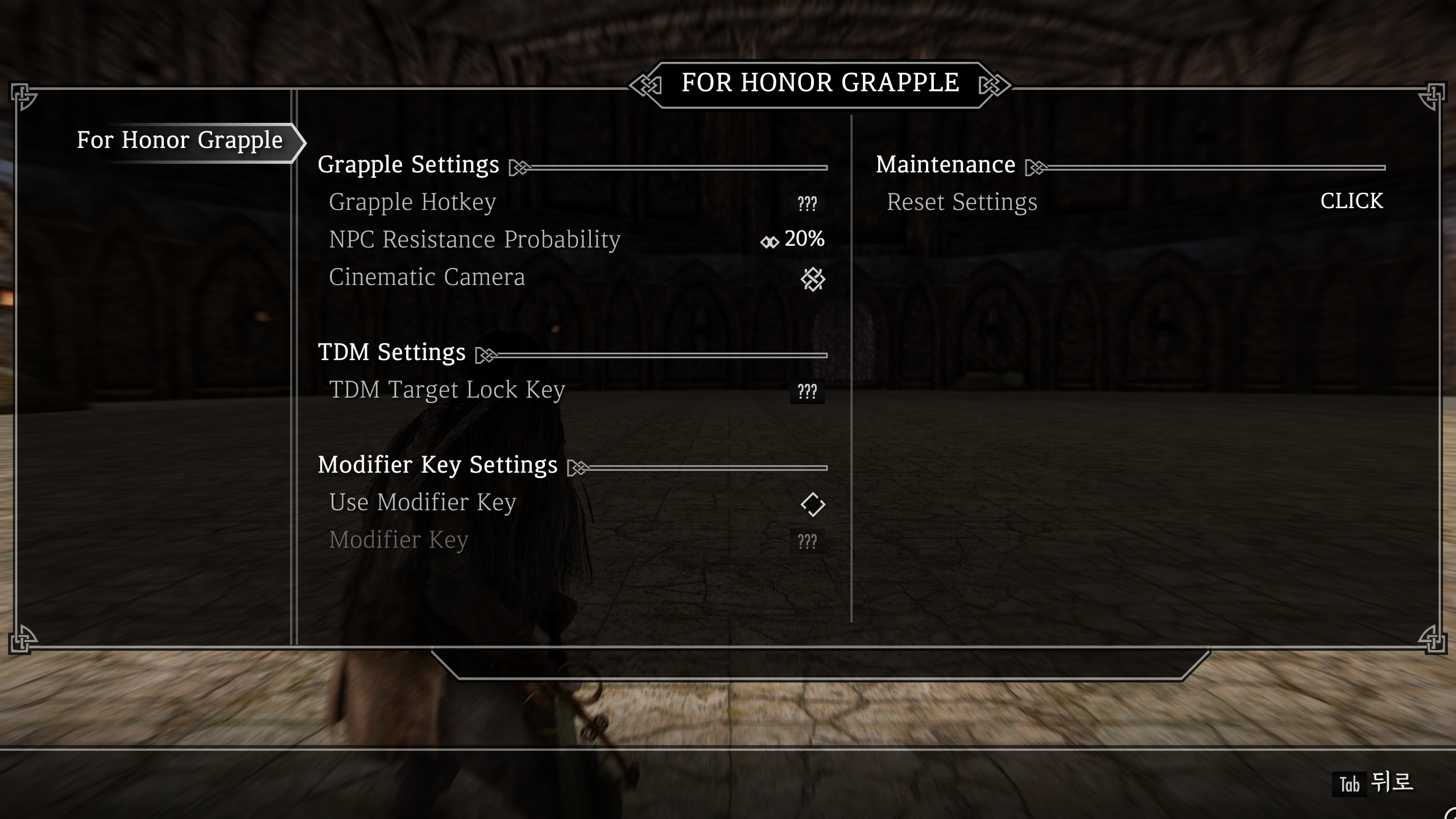
MCM Configuration Guide
After installation, you can configure detailed settings in the MCM (Mod Configuration Menu).
1. Grapple Settings (Basic)
- Grapple Hotkey: Assign the hotkey to use the grapple skill.
- NPC Resistance Probability: Set the chance for enemies to resist your grab. (0% ~ 100%)
- 0%: Always Success
- 100%: Always Fail (Countered)
- Tip: Setting it to 20~30% offers the most balanced fun.
- Cinematic Camera: Toggle the cinematic camera effect on or off. (Default: ON)
2. TDM Settings (Compatibility)
- TDM Target Lock Key:
- If using True Directional Movement (TDM), set this to your Lock-on key.
- This temporarily unlocks the target during the move to prevent the character from spinning or camera dizziness.
3. Modifier Key Settings
- Use Modifier Key: Enable this to trigger the skill via [Modifier + Hotkey] instead of a single key. (Useful for preventing accidental presses).
- Modifier Key: Assign keys like Shift, Ctrl, or Alt.
4. Maintenance
- Reset Settings: Resets all settings to default values.
Requirements
AE Users
Precision - Accurate Melee Collisions
Behavior Data Injector Universal Support
Trigger Combat Behaviour - TCB
SE Users
Precision - Accurate Melee Collisions
Trigger Combat Behaviour - TCB
스카이림의 전투를 영화처럼!
For Honor in Skyrim - Grapple은 여러분의 스카이림에 '포 아너(For Honor)' 스타일의 역동적인 그래플(Grapple) 액션을 추가합니다.
복잡한 커맨드는 필요 없습니다. 버튼 하나로 적을 붙잡아 제압하고, 영화 같은 카메라 연출로 전투의 짜릿함을 느껴보세요!
주요 특징
- 원터치 제압 액션 : 단축키 입력 한 번으로 적을 붙잡아 화려한 애니메이션과 함께 제압합니다.
- 시네마틱 카메라 : 기술 발동 시 줌인(Zoom-in) 및 카메라 구도 변경을 통해 액션 영화의 한 장면 같은 몰입감을 선사합니다.
- 긴장감 넘치는 저항 시스템 : 모든 적이 쉽게 당해주지는 않습니다. 설정한 확률에 따라 적이 당신의 기술을 뿌리치고 반격할 수 있어 전투의 긴장감을 유지합니다.
- 완벽한 커스터마이징 : 기술 발동 키, 성공 확률, 카메라 연출 여부 등 모든 것을 MCM에서 내 입맛대로 설정할 수 있습니다.
- TDM 호환성 : True Directional Movement (TDM) 사용자를 위한 자동 락온 해제 기능을 지원하여 모션 꼬임 없이 매끄러운 전투가 가능합니다.
MCM 설정 가이드
모드 설치 후 시스템 메뉴의 MCM(Mod Configuration Menu)에서 세부 설정을 변경할 수 있습니다.
1. Grapple Settings (기본 설정)
- Grapple Hotkey: 그래플 기술을 사용할 단축키를 지정합니다.
- NPC Resistance Probability: 적이 내 기술에 저항할 확률을 설정합니다. (0% ~ 100%)
- 0%: 무조건 성공
- 100%: 무조건 실패(반격당함)
- Tip: 20~30% 정도로 설정하면 가장 재미있는 밸런스를 즐길 수 있습니다.
- Cinematic Camera: 기술 성공 시 시네마틱 카메라 연출을 켤지 끕니다. (Default: ON)
2. TDM Settings (TDM 호환 설정)
- TDM Target Lock Key:
- True Directional Movement (TDM) 모드를 사용 중이라면, 평소 사용하는 락온(Lock-on) 키와 동일하게 설정해주세요.
- 기술 사용 시 자동으로 락온을 잠시 풀어주어, 캐릭터가 빙글빙글 돌거나 카메라가 어지러워지는 현상을 막아줍니다.
3. Modifier Key Settings (보조키 설정)
- Use Modifier Key: 이 옵션을 켜면 단축키 단독 입력 대신 [보조키 + 단축키] 조합으로 기술을 발동합니다. (키 부족 및 오작동 방지에 유용)
- Modifier Key: Shift, Ctrl, Alt 등 함께 누를 보조키를 지정합니다.
4. Maintenance (관리)
- Reset Settings: 모든 설정을 초기값으로 되돌립니다.
필요모드
AE 사용자
Precision - Accurate Melee Collisions
Behavior Data Injector Universal Support
Trigger Combat Behaviour - TCB
SE 사용자
Precision - Accurate Melee Collisions
Trigger Combat Behaviour - TCB
'For Honor in Skyrim > Extended Moveset' 카테고리의 다른 글
| Open Animation Replacer - RaySense (1) | 2026.02.22 |
|---|---|
| For Honor in Skyrim Grapple / Unarmed / RKO (0) | 2026.01.27 |
| For Honor in Skyrim Grapple 1.3 (0) | 2026.01.25 |
| For Honor Real Time Waiting (0) | 2026.01.20 |
| For Honor in Skyrim Lawbringer / Poleaxe Moveset (0) | 2026.01.14 |


