
Smooth Motion Factory
Skyrim Annotation Add-on 본문
Skyrim Annotation Add-on User Manual
The Skyrim Annotation add-on is a tool designed to easily manage 'Animation Markers (Annotations)' required for Skyrim animation work in Blender.
Key Features
- Long Marker Name Support: Overcoming Blender's default limit (63 characters), it allows writing and exporting marker text of up to 200 characters or more.
- Preset Management: Save and load frequently used marker sets.
- Animmotion Automation: Automatically generate motion markers based on object location keyframes, or conversely convert markers into location keyframes.
- Convenient UI: Manage the entire list at a glance and reorder markers easily.
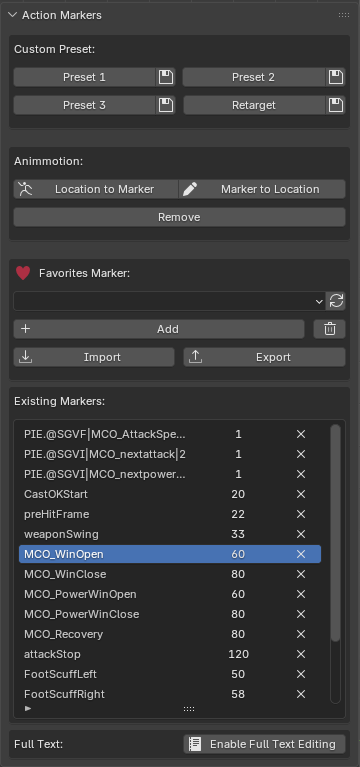
UI Interface & Features
The add-on panel is located in the 3D Viewport Sidebar (`N` key) > Marker tab.
1. Custom Preset
This feature allows you to save frequently used marker configurations as text files and apply them to the current action when needed.
- Preset 1 / 2 / 3:
- Import (Button with name): Loads markers saved in the corresponding preset file (`Marker_Custom_PresetX.txt`) to the current frame/time.
- Export (Check icon): Saves all markers in the current action to the corresponding preset file.
- Retarget: A slot for managing marker sets specifically for retargeting tasks. Usage is the same as above.
2. Animmotion
Tools for handling `animmotion` markers, often used for translation/movement processing in Skyrim.
- Location to Marker: Analyzes the object's Location Keyframes and automatically generates markers in the format `animmotion [X] [Y] [Z]` at each keyframe. Used to convert movement paths animated in Blender into marker data.
- Marker to Location: Reads `animmotion` marker data and converts it into actual Location Keyframes for the object. Useful for converting imported marker data into visual location movement for editing.
- Remove: Batch deletes all markers whose names start with `animmotion`.
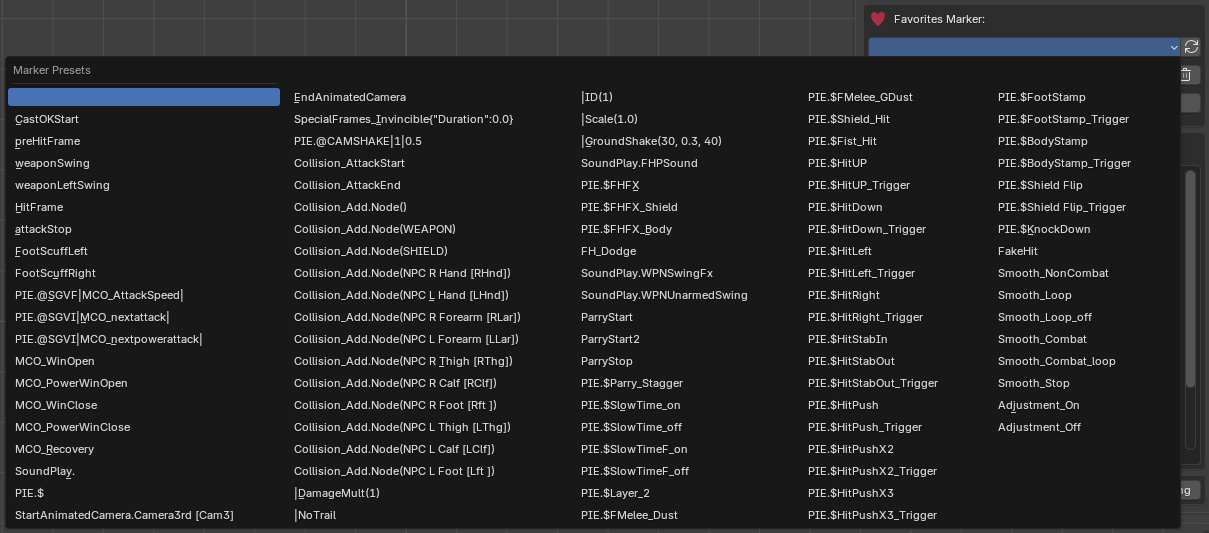
3. Favorites Marker
A section to quickly add individual markers defined in the `marker_presets.txt` file.
- Marker Presets (Dropdown): Select one of the markers registered in `marker_presets.txt` to add it immediately.
- Reload (Refresh icon): Refreshes the list without restarting Blender if you have modified the text file.
- Add: Adds a new marker with the default name ("NewMarker").
- Trash Icon (Remove All): Deletes all markers in the current action. (Caution: Undo is possible).
- Import / Export: Loads or saves marker data as a text file for backup purposes.
4. Existing Markers
Displays and manages all markers existing in the current action as a list.
- List View: Check names and frame positions. Press the `X` button to delete individual markers.
- Full Text: An input box that appears at the bottom when you select a marker. Use this to edit long marker names without the 63-character limit.
Modifying the name directly in the list is subject to a 63-character limit. To edit longer names, use the "Full Text" box below the list.
If you select a marker created with an older version, an "Enable Full Text Editing" button will appear. Click it once to initialize the data for long text editing.
5. Shortcuts
- Ctrl + ↑ (Up Arrow): Move the selected marker up in the list (Reorder).
- Ctrl + ↓ (Down Arrow): Move the selected marker down in the list (Reorder).
GitHub Main Page
Skyrim Annotation Add-on 사용 설명서
Skyrim Annotation 애드온은 블렌더에서 스카이림 애니메이션 작업을 할 때 필요한 '애니메이션 마커(Annotation)'를 손쉽게 관리할 수 있도록 돕는 도구입니다.
주요 기능
- 긴 마커 이름 지원: 블렌더 기본 제한(63자)을 넘어, 최대 200자 이상의 긴 마커 텍스트를 작성하고 내보낼 수 있습니다.
- 프리셋 관리: 자주 쓰는 마커 세트를 저장하고 불러올 수 있습니다.
- 애니모션(Animmotion) 자동화: 오브젝트의 위치 키프레임을 기반으로 모션 이동 마커를 자동 생성하거나, 반대로 마커를 위치 키프레임으로 변환할 수 있습니다.
- 편리한 UI: 리스트에서 마커 순서를 변경하거나 전체 목록을 한눈에 관리할 수 있습니다.
UI 인터페이스 및 기능 설명
애드온 패널은 3D Viewport의 사이드바(`N` 키) > Marker 탭에 위치합니다.
1. Custom Preset (커스텀 프리셋)
자주 사용하는 마커 구성을 텍스트 파일로 저장해두고, 필요할 때 불러와서 현재 액션에 적용하는 기능입니다.
- Preset 1 / 2 / 3:
- Import (버튼 이름): 해당 프리셋 파일(`Marker_Custom_PresetX.txt`)에 저장된 마커들을 현재 프레임/시간에 맞춰 불러옵니다.
- Export (체크 아이콘): 현재 액션의 모든 마커를 해당 프리셋 파일로 저장합니다.
- Retarget: 리타게팅 작업 시 자주 쓰이는 특정 마커 세트를 관리하는 슬롯입니다. 사용법은 위와 동일합니다.
2. Animmotion (애니모션)
스카이림의 이동 모션(Translation) 처리를 위한 `animmotion` 마커를 다루는 도구입니다.
- Location to Marker: 현재 오브젝트의 Location(위치) 키프레임을 분석하여, 각 키프레임 위치에 `animmotion [X] [Y] [Z]` 형식의 마커를 자동으로 생성합니다.
- Marker to Location: `animmotion` 마커 데이터를 읽어, 오브젝트의 실제 Location 키프레임으로 변환합니다. 마커 데이터를 시각적으로 확인하거나 수정할 때 유용합니다.
- Remove: 이름이 `animmotion`으로 시작하는 모든 마커를 일괄 삭제합니다.
3. Favorites Marker (즐겨찾기 마커)
`marker_presets.txt` 파일에 정의된 개별 마커를 빠르게 추가하는 섹션입니다.
- Marker Presets (드롭다운): 등록된 마커 목록 중 하나를 선택하면 즉시 추가됩니다.
- Reload (새로고침 아이콘): 텍스트 파일을 수정했을 경우, 블렌더를 끄지 않고 목록을 갱신합니다.
- Add (추가): 기본 이름("NewMarker")을 가진 새 마커를 추가합니다.
- 휴지통 아이콘 (Remove All): 현재 액션에 있는 모든 마커를 삭제합니다. (주의: 되돌리기 가능)
- Import / Export: 마커 데이터를 텍스트 파일로 불러오거나 내보내 백업합니다.
4. Existing Markers (기존 마커 관리)
현재 액션에 존재하는 모든 마커를 리스트 형태로 보여주고 관리합니다.
- 리스트 뷰: 마커 이름과 프레임 위치를 확인하고 `X` 버튼으로 삭제할 수 있습니다.
- Full Text (전체 텍스트): 리스트에서 마커를 선택하면 하단에 나타나는 입력창입니다. 63글자 제한 없이 긴 마커 이름을 자유롭게 수정할 수 있습니다.
리스트 상의 이름을 직접 수정하면 63글자 글자 수 제한이 있습니다. 긴 이름을 수정하려면 반드시 하단의 "Full Text" 창을 사용하세요.
구버전 애드온으로 만든 마커를 선택하면 "Enable Full Text Editing" 버튼이 나타납니다. 한 번 클릭해주면 긴 텍스트 편집이 가능해집니다.
5. 단축키
- Ctrl + ↑ (위쪽 화살표): 선택한 마커를 목록에서 위로 이동 (순서 변경)
- Ctrl + ↓ (아래쪽 화살표): 선택한 마커를 목록에서 아래로 이동 (순서 변경)
GitHub Main Page